Tesseract OCR in C#
and .NET.
A tested guide to Tesseract in C#: which NuGet package to pick, the fix for the Linux DllNotFoundException, thread-safe ASP.NET Core use, and accuracy and speed numbers we measured ourselves.
On this page
What we measured (the short version)
Everything below was run or measured on a Linux machine with .NET 8. The numbers come from our own test pages, not from vendor material; the method and its limits are at the end, and you can download the harness and raw results.
- Both NuGet packages are Windows-only inside. We unpacked
Tesseract5.2.0 andTesseractOCR5.5.2: each contains only x86/x64 Windows DLLs. On Linux you supplylibtesseractandlibleptonicaand link them under the names the package looks for — three symlinks, shown below. - The wrapper does not change the text. On nine test pages both wrappers returned text byte-identical to the
tesseractcommand-line tool built from the same libraries. - A
TesseractEnginecannot be shared between threads. With four threads on one engine, 39 of 40 calls threw. Use one engine per thread, or a pool. - Thread settings can cost you 3× throughput. On Ubuntu’s OpenMP-enabled
libtesseract, four threads gave 3.7 pages/s; the same code withOMP_THREAD_LIMIT=1gave 10.6 pages/s. - Preprocessing can hurt as easily as help. Sauvola binarisation fixed an unevenly lit page (63.7% → 0.0% character errors) and turned a low-contrast page into empty output (100%).
- Confidence is not a quality score. One run got 63.7% of its characters wrong or missing and still reported a mean confidence of 0.92.
Quickstart: OCR an image in C#
Install the NuGet package, put eng.traineddata in a tessdata folder, and run this. On Linux, do the three-symlink step first.
// dotnet add package Tesseract --version 5.2.0
using Tesseract;

using var engine = new TesseractEngine("./tessdata", "eng", EngineMode.Default);
using var img = Pix.LoadFromFile("receipt.png");
using var page = engine.Process(img);
Console.WriteLine(page.GetText());CORNER MARKET
12 Harbour Street
Oat milk 1L 2.49
Sourdough loaf 3.80
Free-range eggs x6 2.95
Bananas 1.2kg 1.38
Dark chocolate 85% 2.20
Coffee beans 250g 6.50
SUBTOTAL 19.32
VAT 5% 0.97
TOTAL 20.29
CARD ****4821 APPROVED
Thank you for shopping!The same program with the newer TesseractOCR package differs in names only (we ran both):
// dotnet add package TesseractOCR --version 5.5.2
using TesseractOCR;
using TesseractOCR.Enums;

using var engine = new Engine("./tessdata", Language.English, EngineMode.Default);
using var img = TesseractOCR.Pix.Image.LoadFromFile("receipt.png");
using var page = engine.Process(img);
Console.WriteLine(page.Text);
On a clean Linux machine the first thing you see is usually not text but a DllNotFoundException. It is the most common problem with these packages and has its own section.
Video: the same OCR in four languages, with the Linux fix
Working code on one receipt in JavaScript, C#, Java and Go, plus the three-symlink fix for the C# package, in about 3 minutes.
Which NuGet package: Tesseract or TesseractOCR?
Two wrappers matter. Both are Apache-2.0, both call the native library through P/Invoke, and both descend from Charles Weld’s wrapper. Facts below come from the packages themselves and the NuGet API on 17 Nov 2026.
Tesseract | TesseractOCR | |
|---|---|---|
| Latest version | 5.2.0 | 5.5.2 |
| Published | 30 Nov 2022 | 5 Mar 2026 |
| Total downloads | 11.2 million | 794 thousand |
| Maintainers | Charles Weld | Charles Weld & Kees van Spelde |
| Native files inside | tesseract50.dll, leptonica-1.82.0.dll (x86, x64) | tesseract55.dll, leptonica-1.85.0.dll (x86, x64) |
| Linux / macOS / ARM binaries | None | None |
| Image type | Pix | TesseractOCR.Pix.Image |
| Result API | page.GetText() | page.Text, page.Layout tree |
| Target frameworks | .NET Standard 2.0, .NET Framework 4.7/4.8 | .NET Standard 2.0 and 2.1 |
What this means in practice. On Linux the wrapper only loads the engine you installed, so wrapper choice barely matters there: both produced text byte-identical to the CLI in our tests. The difference shows on Windows, where the package’s own DLLs are the engine — TesseractOCR bundles a newer one (we did not test Windows).
Our recommendation. New project: TesseractOCR, because it is still being released. Existing project on Tesseract 5.2.0 that works: there is no accuracy reason to migrate on Linux. Upstream Tesseract has moved on to 5.5.4, so neither package ships the newest engine, and the TesseractOCR docs disagree with themselves (its README says Tesseract 5.5.0, its NuGet description says 5.5.1, the DLL is named tesseract55).
Other routes, not benchmarked here: the tesseract CLI through Process (works everywhere, but roughly 110–120 ms slower per image in our speed test), Windows.Media.Ocr (Windows-only, not Tesseract) and commercial libraries such as IronOCR. In the search results we looked at for this topic, most C# tutorials were written by a commercial OCR vendor, so weigh their claims about Tesseract accordingly.
Project setup: tessdata and the .csproj
Tesseract needs a language file (eng.traineddata) from tessdata_fast or tessdata_best. Copy it to the output folder so the path works after dotnet publish.
<ItemGroup>
  <PackageReference Include="Tesseract" Version="5.2.0" />
  <!-- copies tessdata\eng.traineddata next to the executable -->
  <None Include="tessdata\*.traineddata" CopyToOutputDirectory="PreserveNewest" LinkBase="tessdata" />
</ItemGroup>
Then build the path from the app folder, not the working directory, so it still works when the app is started from elsewhere:
var tessdata = Path.Combine(AppContext.BaseDirectory, "tessdata");
using var engine = new TesseractEngine(tessdata, "eng", EngineMode.Default);tesseract-ocr-eng package (4.1.0-2) is byte-identical to tessdata_fast — we compared checksums. In our tests best (15.4 MB vs 4.1 MB) was not more accurate: it was worse at 72 DPI (6.7% vs 4.2% character errors) and better on one low-contrast page (1.7% vs 3.2%). See accuracy.Linux: fixing DllNotFoundException (three symlinks)
On a clean Ubuntu 24.04 x64 machine with .NET 8, the quickstart fails. We reproduced the failure, then added one fix at a time and recorded the next error. Both packages need the same three kinds of link; only the file names differ.
FAIL System.Reflection.TargetInvocationException: Exception has been thrown by the target of an invocation.
inner System.DllNotFoundException: Failed to find library "libleptonica-1.82.0.so" for platform x64.| Step | What we did | Next error |
|---|---|---|
| 1 | Nothing | Failed to find library "libleptonica-1.82.0.so" |
| 2 | Installed the system libraries only | Same error: installing them is not enough |
| 3 | + link leptonica | Unable to load shared library 'libdl' |
| 4 | + link tesseract | Still libdl |
| 5 | + libdl.so link | Works |
We then removed each link from the working setup. Removing the Tesseract link gives Failed to find library "libtesseract50.so"; removing libdl.so brings back the libdl error. All three are required. The libdl link is needed because glibc 2.34 and newer ship only libdl.so.2.
sudo apt install -y libtesseract5 liblept5      # Ubuntu 24.04: Tesseract 5.3.4, Leptonica 1.82.0
dotnet build
OUT=bin/Debug/net8.0
ln -sf /usr/lib/x86_64-linux-gnu/liblept.so.5      $OUT/x64/libleptonica-1.82.0.so
ln -sf /usr/lib/x86_64-linux-gnu/libtesseract.so.5 $OUT/x64/libtesseract50.so
ln -sf /lib/x86_64-linux-gnu/libdl.so.2            $OUT/libdl.so
dotnet run| Package | In x64/ | Next to the app |
|---|---|---|
Tesseract 5.2.0 | libleptonica-1.82.0.so, libtesseract50.so | libdl.so |
TesseractOCR 5.5.2 | libleptonica-1.85.0.dll.so, libtesseract55.dll.so | libdl.so |
Version mixing. We also ran the 5.2.0 wrapper against a Tesseract 5.5.1 engine, and the 5.5.2 wrapper against Ubuntu’s 5.3.4 engine under the 5.5 file name. Both produced correct text for plain OCR. That is a basic-path result, not a guarantee for every API call — match versions where you can.
Do it once, in the project file. This MSBuild fragment creates the links on every Linux build and publish (tested with dotnet build and dotnet publish, then run from another directory):
<PropertyGroup Condition="$([MSBuild]::IsOSPlatform('Linux'))">
<LibDir Condition="'$(LibDir)' == ''">/usr/lib/x86_64-linux-gnu</LibDir>
</PropertyGroup>
<Target Name="LinkTesseractBuild" AfterTargets="Build" Condition="$([MSBuild]::IsOSPlatform('Linux'))">
<Exec Command="mkdir -p "$(OutDir)x64" && ln -sf $(LibDir)/liblept.so.5 "$(OutDir)x64/libleptonica-1.82.0.so" && ln -sf $(LibDir)/libtesseract.so.5 "$(OutDir)x64/libtesseract50.so" && ln -sf /lib/x86_64-linux-gnu/libdl.so.2 "$(OutDir)libdl.so"" />
</Target>
<Target Name="LinkTesseractPublish" AfterTargets="Publish" Condition="$([MSBuild]::IsOSPlatform('Linux'))">
<Exec Command="mkdir -p "$(PublishDir)x64" && ln -sf $(LibDir)/liblept.so.5 "$(PublishDir)x64/libleptonica-1.82.0.so" && ln -sf $(LibDir)/libtesseract.so.5 "$(PublishDir)x64/libtesseract50.so" && ln -sf /lib/x86_64-linux-gnu/libdl.so.2 "$(PublishDir)libdl.so"" />
</Target>libtesseract5 and liblept5 in the runtime image and let the project file above create the links. Neither package contains macOS or ARM binaries (we listed the package files), so on those platforms you must install the native libraries yourself. Windows uses the bundled DLLs; the TesseractOCR README says they need the Visual C++ 2022 runtime. We did not run any of these.Reading text: languages, page modes, whitelists, word boxes
Everything on this page uses the default page segmentation mode, Auto (PSM 3), unless a table says otherwise; both wrappers default to it.
Languages. Put a .traineddata file per language in tessdata and join codes with +. On a line of mixed English and German, English-only recognition garbled the umlauts; adding German fixed it:
new TesseractEngine(tessdata, "eng",     ...)  ->  ... Grdfe, Miiller, Strae
new TesseractEngine(tessdata, "eng+deu", ...)  ->  ... Größe, Müller, Straße
Page segmentation mode. Pass it to Process:
using var page = engine.Process(img, PageSegMode.SingleBlock); // PSM 6Whitelist. Restrict output to digits for prices or meter readings. Be careful: it does not skip other characters, it forces them into the allowed set.
engine.SetVariable("tessedit_char_whitelist", "0123456789.");
// receipt line "Coffee beans 250g 6.50"  ->  "2509 6.50"   (the g became a 9)
Word boxes and confidence. Walk the result with the iterator. This is the code that drew the boxes below.
using var page = engine.Process(img);
using var it = page.GetIterator();
it.Begin();
do
{
    var text = it.GetText(PageIteratorLevel.Word);
    if (string.IsNullOrWhiteSpace(text)) continue;
    it.TryGetBoundingBox(PageIteratorLevel.Word, out var r);
    Console.WriteLine($"{it.GetConfidence(PageIteratorLevel.Word):F0}  {text}  at {r.X1},{r.Y1} {r.Width}x{r.Height}");
} while (it.Next(PageIteratorLevel.Word));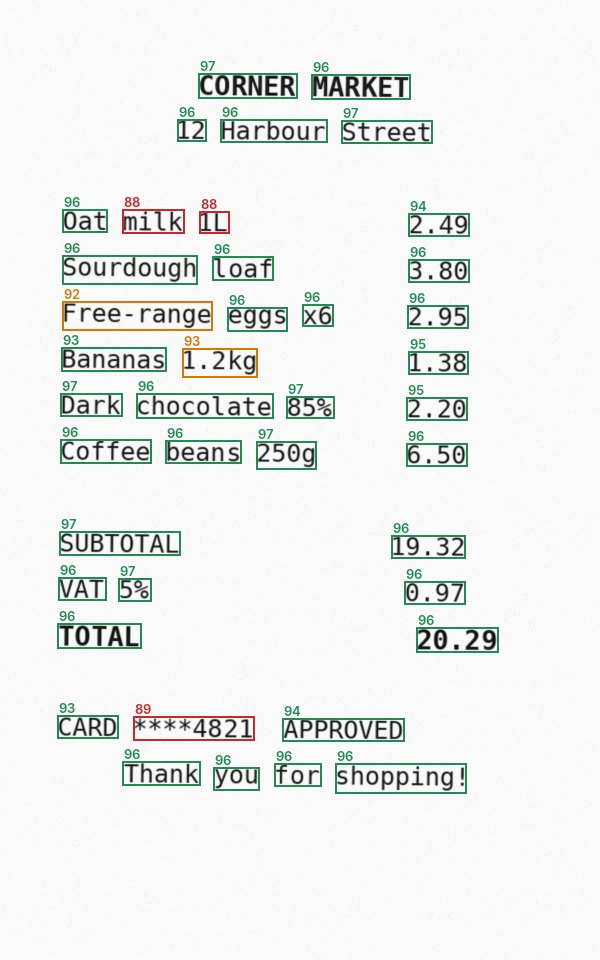
Measured accuracy: DPI, models, page modes and preprocessing
We rendered pages with known text, damaged them in controlled ways, and scored the output as character error rate (CER: edit distance divided by the length of the true text; 0% is perfect and 100% means nothing usable came back). The pages are synthetic English, 10–11 pt text, so treat the pattern as more reliable than the exact figures.
Resolution
| Scan resolution | tessdata_fast | tessdata_best | fast + 2× upscale |
|---|---|---|---|
| 72 DPI | 4.2% | 6.7% | 0.0% |
| 100 DPI | 0.0% | 0.3% | 0.0% |
| 150 DPI | 0.0% | 0.2% | 0.0% |
| 200 DPI | 0.0% | 0.0% | 0.0% |
| 300 DPI | 0.0% | 0.2% | 0.0% |
From 100 DPI up, 11 pt text was read essentially perfectly with either model; at 72 DPI the 2× upscale (pix.Scale(2f, 2f)) removed all errors. The 5.5.2 stack was within 0.2 points of these figures.
Which preprocessing step helps
| Test page | None | 2× upscale | Deskew | Sauvola |
|---|---|---|---|---|
| 72 DPI text | 4.2% | 0.0% | 4.2% | 9.0% |
| Rotated 5° | 0.5% | 1.1% | 0.0% | 1.2% |
| Heavy noise + blur | 0.0% | 0.0% | 0.0% | 0.4% |
| Strong blur | 0.0% | 0.2% | 0.0% | 0.8% |
| Low contrast | 3.2% | 3.0% | 3.2% | 100% |
| Uneven lighting (left side dark) | 63.7% | 100% | 63.7% | 0.0% |
| Uneven lighting + 3° tilt + blur | 55.6% | 76.1% | 56.9% | 0.2% |
| Receipt sample | 0.0% | 1.6% | 0.0% | 0.8% |
- Do nothing by default. Noise, blur and JPEG damage at 300 DPI cost nothing here; the engine copes, and each extra step is a chance to break something.
- Upscale only small text. It fixed 72 DPI and made the shaded page worse.
- Deskew when pages are rotated. Even 5° cost half a percent; deskew fixed it.
- Use adaptive binarisation only for uneven lighting. It is a rescue for shadows and phone photos, and destructive for faint text. It needs 8-bit grayscale input; we only tested grayscale files.
using var raw = Pix.LoadFromFile(path);
using var big = raw.Scale(2f, 2f);                         // small or low-DPI text
using var straight = raw.Deskew();                         // rotated scans
using var flat = raw.BinarizeSauvola(25, 0.35f, true);     // uneven lighting only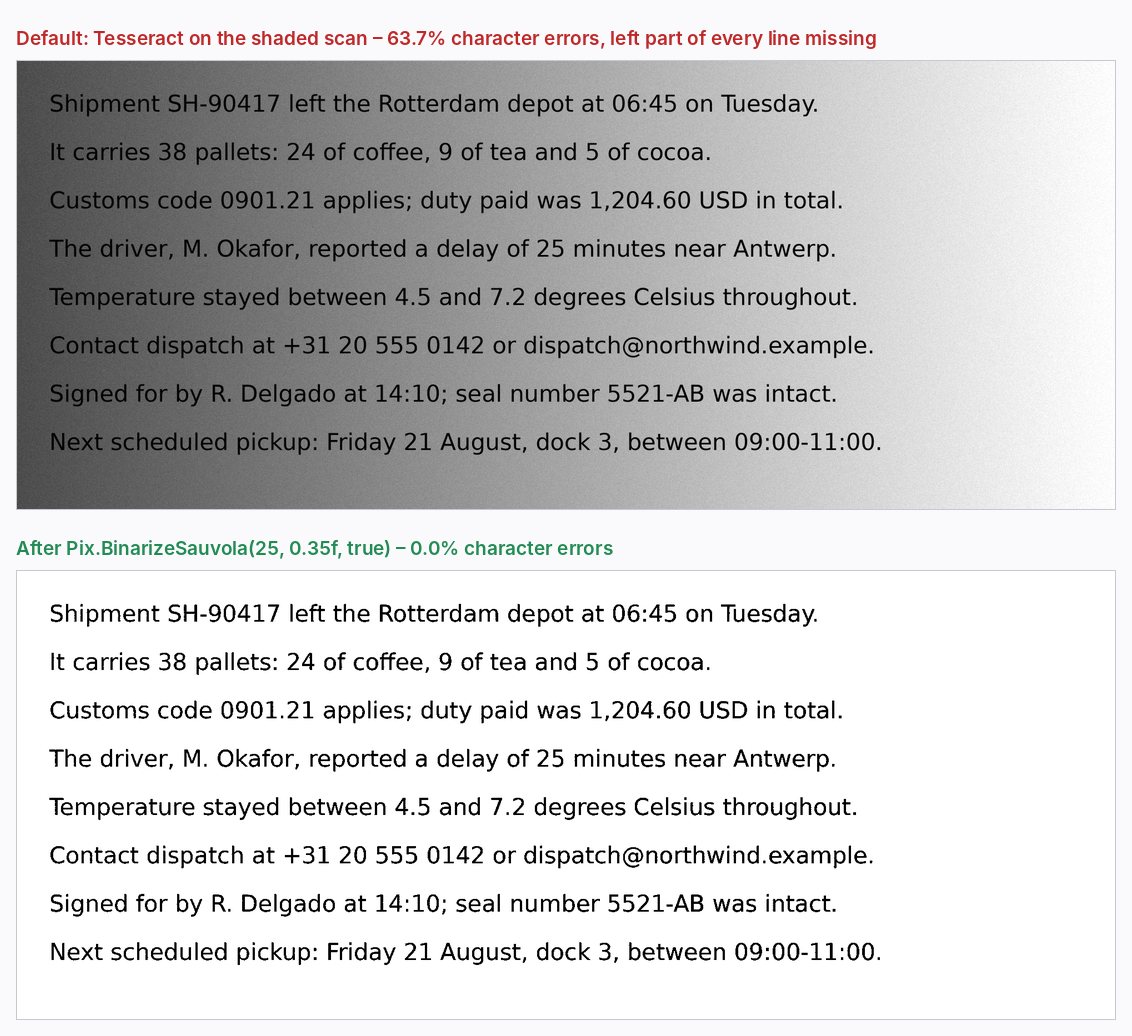
BinarizeSauvola(25, 0.35f, true).Page segmentation mode
| Test page | PSM 3 (Auto) | PSM 6 (SingleBlock) | PSM 11 (SparseText) |
|---|---|---|---|
| Clean text | 0.0% | 0.0% | 0.2% |
| Receipt sample | 0.0% | 0.0% | 4.9% |
| Low contrast | 3.2% | 8.3% | 4.5% |
| Uneven lighting | 63.7% | 49.7% | 63.7% |
| Rotated 5° text | 0.5% | 0.5% | 57.6% |
On the receipt, PSM 11 dropped the leading digit and decimal point from several prices (2.49 became 49), which is exactly the kind of error that corrupts totals without looking wrong. Auto and SingleBlock read every price. The default is a safe starting point; the documentation explains each mode.
Confidence can mislead
| Situation | Text recovered | Mean confidence |
|---|---|---|
| Uneven lighting, no preprocessing | About a third (left parts of lines missing) | 0.92 |
| Low-contrast page after Sauvola | None (empty string) | 0.95 |
| Completely blank page | None | 0.00 |
The score describes the words the engine did read, not the ones it skipped. Check that the output is not empty and that it has the number of lines you expect before trusting it.
Speed: in-process versus the command line
One 1980×810-pixel page of eight text lines, tessdata_fast, 4 vCPU. Each row is three fresh processes of 30 timed pages after the engine is warm.
| Setup | Engine start | Per page (median) | Memory |
|---|---|---|---|
Tesseract 5.2.0 + Ubuntu libs (Tesseract 5.3.4, OpenMP build) | 110–130 ms | 358–383 ms | 75 MB |
TesseractOCR 5.5.2 + Tesseract 5.5.1 built from source (no OpenMP) | 134–148 ms | 254–264 ms | 70 MB |
tesseract CLI per image, 5.3.4 / 5.5.1 | — | 485 / 366 ms (includes process start and model load) | — |
Keeping an engine alive saves roughly the start-up cost per image (roughly 110–120 ms here), which matters when you process many small images. Do not read the 5.3.4 versus 5.5.1 gap as a version effect: the two stacks differ in version and in how they were built (our source build has no OpenMP). The relative picture is the useful part; absolute times depend on your CPU, and our sandbox was a shared 4-core machine.
Threads: one engine per thread, and OMP_THREAD_LIMIT=1
A TesseractEngine holds state for one recognition at a time. We tested what happens when you ignore that, and what the best structure is.
| Structure | Default | OMP_THREAD_LIMIT=1 |
|---|---|---|
| 1 engine, 1 thread (baseline) | 2.6 | 3.2–3.5 |
| 1 shared engine, no lock, 4 threads | 39 of 40 calls throw | 39 of 40 calls throw |
| 1 shared engine behind a lock, 4 callers | 0.41 | 3.1 |
| 4 engines, one per thread | 3.7 | 10.6 |
Shared and unlocked, the wrapper protects you with an exception rather than corrupting memory: InvalidOperationException: Only one image can be processed at once. Please make sure you dispose of the page once your finished with it. The same message appears if you forget to dispose a Page.
Why the default is slow (inferred). Ubuntu’s libtesseract is linked against OpenMP (libgomp; confirmed with ldd) and each calling thread seems to get its own team of spinning worker threads, so four callers oversubscribe four cores. A locked shared engine was 6× slower than a single thread (0.41 versus 2.6 pages/s). Setting the environment variable OMP_THREAD_LIMIT=1 before the process starts removed the effect. Our source build has no OpenMP and did not show the problem. Not tested: how the Windows DLLs behave.
OMP_THREAD_LIMIT=1 in the process environment (Dockerfile ENV, systemd unit or launch profile). It is the structure the numbers favour; the next section is that code.ASP.NET Core: a pooled OCR endpoint
A minimal API that rents an engine per request. We ran it with 8 parallel clients sending 40 images: all returned HTTP 200 in 3.7 seconds with four pooled engines and OMP_THREAD_LIMIT=1.
using System.Collections.Concurrent;
using Tesseract;

var builder = WebApplication.CreateBuilder(args);
builder.Services.AddSingleton<OcrPool>();
var app = builder.Build();

app.MapPost("/ocr", async (HttpRequest req, OcrPool pool) =>
{
    using var ms = new MemoryStream();
    await req.Body.CopyToAsync(ms);
    using var img = Pix.LoadFromMemory(ms.ToArray());
    var engine = pool.Rent();
    try
    {
        using var page = engine.Process(img);
        return Results.Json(new { text = page.GetText().Trim(), confidence = page.GetMeanConfidence() });
    }
    finally { pool.Return(engine); }
});

app.Run();

// TesseractEngine is not safe for concurrent use: each request borrows one and gives it back.
sealed class OcrPool : IDisposable
{
    private readonly BlockingCollection<TesseractEngine> _engines = new();
    public OcrPool(IConfiguration cfg)
    {
        var tessdata = cfg["TESSDATA"] ?? "./tessdata";
        for (int i = 0; i < Environment.ProcessorCount; i++)
            _engines.Add(new TesseractEngine(tessdata, "eng", EngineMode.Default));
    }
    public TesseractEngine Rent() => _engines.Take();     // waits if all engines are busy
    public void Return(TesseractEngine e) => _engines.Add(e);
    public void Dispose() { while (_engines.TryTake(out var e)) e.Dispose(); }
}OMP_THREAD_LIMIT=1 TESSDATA=./tessdata ASPNETCORE_URLS=http://127.0.0.1:5057 dotnet run
curl -s -X POST --data-binary @receipt.png http://127.0.0.1:5057/ocr
# {"text":"CORNER MARKET\n12 Harbour Street\n\nOat milk 1L 2.49 ... TOTAL 20.29 ...","confidence":0.94}Need a REST service with Docker, scaling and security instead? See the Tesseract API guide.
OCR a PDF in C#
Tesseract reads images, not PDFs. Render each page to an image first. We used PDFtoImage 5.4.0 (MIT, built on PDFium and SkiaSharp); it ran on our Linux machine without installing anything beyond NuGet packages.
// dotnet add package PDFtoImage        (5.4.0 tested)
using PDFtoImage;
using SkiaSharp;
using Tesseract;

using var engine = new TesseractEngine("./tessdata", "eng", EngineMode.Default);
byte[] pdf = File.ReadAllBytes(args[0]);

for (int i = 0; i < Conversion.GetPageCount(pdf); i++)
{
    // render page i at 300 DPI, then hand the PNG bytes to Tesseract
    using var bitmap = Conversion.ToImage(pdf, page: i, options: new(Dpi: 300));
    using var data = bitmap.Encode(SKEncodedImageFormat.Png, 100);
    using var pix = Pix.LoadFromMemory(data.ToArray());
    using var page = engine.Process(pix);
    Console.WriteLine($"--- page {i + 1}");
    Console.WriteLine(page.GetText().Trim());
}
A two-page scanned PDF went through in 1.6 seconds including start-up, with every line correct. Use a byte[]: the Stream overloads close the stream after one call, so reusing it throws ObjectDisposedException or The given stream does not support reading. For searchable-PDF output and more tools see the PDF guide.
Error catalog (messages we captured)
Each row is a message we triggered on purpose, copied from the program output.
| What you see | Cause | Fix |
|---|---|---|
DllNotFoundException: Failed to find library "libleptonica-1.82.0.so" | Linux: the package has no Linux binary | Install the libraries and link them |
DllNotFoundException: Failed to find library "libtesseract50.so" | Same, Tesseract link missing | Add the libtesseract50.so link |
DllNotFoundException: Unable to load shared library 'libdl' | glibc 2.34+ has only libdl.so.2 | Link libdl.so next to the app |
TesseractException: Failed to initialise tesseract engine plus Error opening data file .../eng.traineddata and Failed loading language 'eng' | Folder wrong, language file missing, or the file is empty (all give the same message) | Check the path you pass and that the file exists and is the right size |
IOException: Failed to load image '/path.png' plus Error in pixRead: image file not found | Wrong image path | Use an absolute path or one relative to the working directory |
InvalidOperationException: Only one image can be processed at once | One engine used by several threads, or a Page not disposed | Pool engines; wrap Page in using |
Estimating resolution as 389 on the console | The image has no DPI metadata | Harmless; OCR still ran |
| Prices lose leading digits | PSM 11 (sparse text) | Use Auto or SingleBlock |
| Half the line is missing but confidence is high | Uneven lighting | BinarizeSauvola |
| Empty string back | Preprocessing removed faint text, or a blank page | Compare with the raw image; blank pages score 0.00 |
How we tested (and what we did not)
You should be able to check or reproduce all of this. Download the harness, generators and raw results (9 KB); regenerating our test pages from the scripts gives byte-identical images.
- Machine. Ubuntu 24.04.5 x86_64, 4 vCPU, 16 GB RAM, glibc 2.39, .NET SDK 8.0.416 (runtime 8.0.22). Run on 17 Nov 2026.
- Packages.
Tesseract5.2.0 andTesseractOCR5.5.2 from NuGet, unpacked and listed. PDFtoImage 5.4.0 for the PDF test. - Engine A. Ubuntu’s own packages
tesseract-ocr5.3.4 andliblept51.82.0. Our sandbox did not allowapt install, so we unpacked the same.debfiles into a private folder and pointedLD_LIBRARY_PATHat it; the symlink targets therefore pointed there instead of/usr/lib, with identical file names. - Engine B. Tesseract 5.5.1 and Leptonica 1.85.0 compiled from source (CMake, Release) — the versions
TesseractOCR5.5.2 declares. This build has PNG support only (no TIFF or JPEG) and no OpenMP, which is why some Leptonica warnings about a missing TIFF reader appear in its output; they do not affect the PNG tests. - Models.
engfrom tessdata_fast throughout (byte-identical to Ubuntu’stesseract-ocr-eng); tessdata_best where stated. - Test pages. Corpus 1: an 8-line invoice paragraph in Liberation Serif 11 pt, rendered at 600 DPI and downsampled to 72–300 DPI, plus rotation, noise and low-contrast variants. Corpus 2: an 8-line freight paragraph in DejaVu Sans 10 pt with heavy noise, blur, JPEG damage, low contrast, a lighting gradient and a photo-like variant, plus this site’s receipt sample, whose true text we transcribed by hand.
- Scoring. CER = edit distance to the true text divided by its length, whitespace collapsed. Timings use a stopwatch around
Process; thread tests ran 40 pages, three repeats (the locked-engine case once). - Not tested. Windows, macOS, ARM, Docker, .NET 9 and 10, languages other than English and German, real scans and photographs, handwriting, tables, and commercial OCR libraries. Our pages are synthetic with one typeface each, so absolute error rates on your documents will differ.
- Measured versus judged. Numbers in tables were measured. Sentences that begin “Our recommendation” or are marked inferred are judgement.
C# Tesseract FAQ
How do I use Tesseract OCR in C#?
Add a Tesseract wrapper from NuGet (Tesseract or TesseractOCR), download eng.traineddata into a tessdata folder, create a TesseractEngine, load an image with Pix.LoadFromFile and call engine.Process(img).GetText(). On Linux you must also install the native libraries and link them, because the packages only contain Windows DLLs.
Why do I get DllNotFoundException on Linux?
The NuGet packages ship Windows DLLs only. Install libtesseract5 and liblept5, then link them into the x64 folder under the names the package expects and add a libdl.so link next to the app. In our test all three links were required.
Which is better, Tesseract or TesseractOCR?
On Linux we saw no accuracy difference: both returned text identical to the tesseract command line. TesseractOCR is the one still being released and bundles a newer engine for Windows, so we would choose it for new projects. We did not test Windows.
Is TesseractEngine thread-safe?
No. Using one engine from four threads made 39 of 40 calls throw an InvalidOperationException. Use one engine per thread or a pool, and on Linux set OMP_THREAD_LIMIT=1 when the library is built with OpenMP: it raised four-thread throughput from 3.7 to 10.6 pages per second in our test.
How do I OCR a PDF in C#?
Render each page to an image first (we used PDFtoImage at 300 DPI), then pass the image to Tesseract. Tesseract cannot read PDF files directly. A two-page scan took 1.6 seconds in our test.
Does preprocessing improve accuracy?
Only when the problem matches the step. 2× upscaling fixed 72 DPI text, deskew fixed rotated scans, and Sauvola binarisation fixed uneven lighting. Sauvola also turned a low-contrast page into empty output, and noise or blur at 300 DPI needed no preprocessing at all.
Does it work on .NET 8, 9 and 10?
We ran .NET 8. Both packages target .NET Standard (2.0 and 2.1), so they load on current .NET versions, but we did not run .NET 9 or 10.
Next steps
Install the engine, use other languages, or go deeper.